What is the E-POSTBUSINESS API?
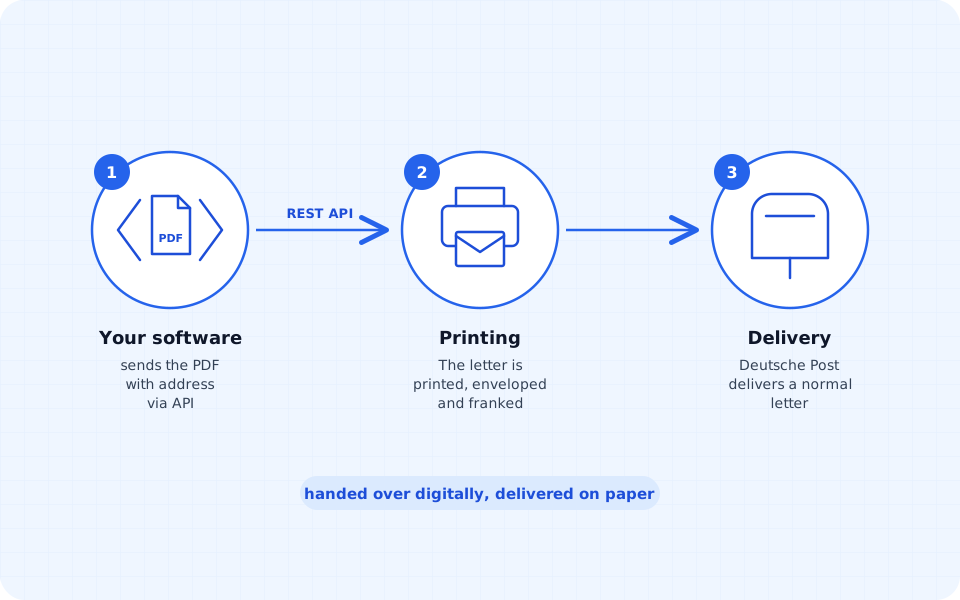
The E-POSTBUSINESS API is the Deutsche Post interface for hybrid letter dispatch. Software hands over letters as PDFs together with the address and print options. Deutsche Post prints, envelopes and franks them and delivers them as normal letters, including in colour, double-sided, as registered mail or abroad.
The API is aimed at software vendors and developers. Anyone using industry or ERP software with an E-POST integration registers as an E-POST customer and then enables dispatch in their software.
Hybrid mail: hand over digitally, deliver on paper
Hybrid mail connects both worlds: you create the letter digitally and transmit it electronically, a service provider prints it and posts it. The recipient gets an ordinary letter. Businesses no longer need printers, envelopes, stamps or the trip to the postbox; dispatch can be triggered from accounting, CRM or specialist software.
Requirements and process at Deutsche Post
For your own integration with the E-POSTBUSINESS API, Deutsche Post lists these steps:
- Registration as a software developer and acceptance of the API’s contract terms.
- For production dispatch: E-POST developer contract, E-POST customer contract and a business customer ID (EKP).
- Activation with vendor ID and EKP; this requires access to the mobile device that was registered when the contract was signed. After that the software logs in with a password and receives a token (JWS) for all further calls.
- The API starts in test mode. For production use you request the switch by email from the API support.
- Letters go in as individual PDF files in PDF/A-1b format; the status is queried afterwards.
Sources (in German): Deutsche Post, E-POSTBUSINESS API, and DHL Developer Portal, Deutsche Post Hybrid Mail Shipments, retrieved on 30/10/2026.
When a provider with its own API is easier
A direct integration pays off mainly for software vendors who offer dispatch to many customers. If you only want to automate your own letters, a hybrid mail provider gets you there faster. With briefsenden.com it looks like this:
- Create an account, create an API key in the dashboard and get started, without your own contract with Deutsche Post.
- Test keys (
bv_test_*) for trying things out: letters run through the API but are not printed and not charged. - Normal PDF files are enough; briefsenden.com takes care of the conversion to the print format.
- Authentication with one header (
X-Api-Key) instead of login and token management. - Prepaid coins instead of a base fee; a standard letter with one sheet costs 91 coins including printing, envelope and postage.
- Status changes via webhook, with a tracking number for registered mail.
A letter is a single request:
curl -X POST https://www.briefsenden.com/api/v1/letters/simple \
  -H "X-Api-Key: bv_test_xxx" \
  -F "file=@invoice.pdf" \
  -F "recipientLine1=Max Mustermann" \
  -F "recipientLine2=Musterstraße 1" \
  -F "recipientZip=12345" \
  -F "recipientCity=Berlin" \
  -F "recipientCountry=DE" \
  -F "color=bw" \
  -F "duplex=simplex"
You will find all endpoints, webhooks and the Swagger UI in the API documentation, and prices and use cases on the page Letter and mail API for Germany. Without any programming of your own it works via Zapier, Make or n8n, see integrations.