
Automate invoice sending
For recurring invoice runs: your accounting system hands over the invoices, briefsenden prints, envelopes and takes them to Deutsche Post – without anyone uploading files by hand.
- DATEV & Lexoffice via Zapier/Make
- REST API with webhooks
- Email-to-Letter
- Mail merge from one PDF
Common problems with invoice runs
An invoice run produces many PDFs at once. Printing, enveloping and franking each invoice individually ties up your accounts team with routine work every month – and the more customers you have, the longer it takes.
Since 1 January 2025, the e-invoicing mandate (E-Rechnungspflicht) has applied to B2B transactions in Germany. Even so, paper is still needed in many cases: the transition periods allow paper invoices until the end of 2026 (or the end of 2027 for smaller companies). In B2C there is no e-invoicing mandate. And many business customers still expect paper invoices – either because of internal processes or because their systems are not yet ready for e-invoices.
So the paper invoice will not disappear but will continue to exist alongside the e-invoice. That makes an efficient sending process all the more important.
Automating invoice sending by post
With briefsenden, your accounts team hands the finished invoices straight to postal dispatch. We print, envelope and hand them over to Deutsche Post without anyone uploading a file by hand.
Only send a single invoice now and then? Uploading it in the browser is enough; the process and costs are explained in Send an invoice by post. If an invoice remains unpaid, the payment reminder goes the same way: Sending payment reminders by post.
Four ways to send invoices automatically
DATEV & Lexoffice via Zapier or Make
A Zap or Make scenario reacts to a new invoice, fetches the PDF and passes it to briefsenden together with the customer’s address. No programming required.
Learn more →REST API
Your software sends the PDF and address to the API, or briefsenden reads the address from the invoice’s address field. Webhooks report "letter.sent" after handover to Deutsche Post and "letter.error" if there is a problem.
Learn more →Email-to-Letter
If your invoicing program can send invoices by email, the email goes to your personal briefsenden address. Each PDF attachment becomes a separate letter, and the address is taken from the PDF. Only senders you have approved are accepted.
Learn more →Mail merge from one PDF
Export the whole invoice run as one PDF with the same number of pages per invoice. briefsenden splits it, reads each address and shows you the recipients for review before sending starts.
Learn more →How to set up invoice sending
- 1
Choose a route and connect
Create an API key in the dashboard and enter it in Zapier, Make or your software. For Email-to-Letter, approve your invoicing program’s sender address instead.
- 2
Check with a test key
Send your first invoices through the API with a test key (bv_test_…). The letters appear in the dashboard, nothing is printed and no coins are deducted.
- 3
Let your invoice runs run
From then on, new invoices go to the post without any manual work. Invoices that reach us on a working day before 4 pm are with Deutsche Post the same day.
E-invoicing mandate & paper invoices
Since 1 January 2025, companies in Germany doing B2B business must in principle be able to receive e-invoices (e.g. ZUGFeRD or XRechnung). For sending, transition periods apply:
Until 31/12/2026
All companies may continue to send paper invoices or other electronic formats (e.g. PDF by email).
Until 31/12/2027
Companies with annual turnover below €800,000 may continue to send paper invoices.
B2C
Invoices to private customers (B2C) are not affected by the e-invoicing mandate. Here, paper invoices remain permitted without restriction.
FAQs on automated invoice sending
Who automates invoice sending
Accounts departments, tax firms and companies that send invoice runs to customers every month and do not want to tie anyone to the printer and stamps.
During the transition to e-invoicing too: business customers who already accept e-invoices receive them electronically from your accounting system. Everyone else gets the invoice by post via briefsenden.
Related guides
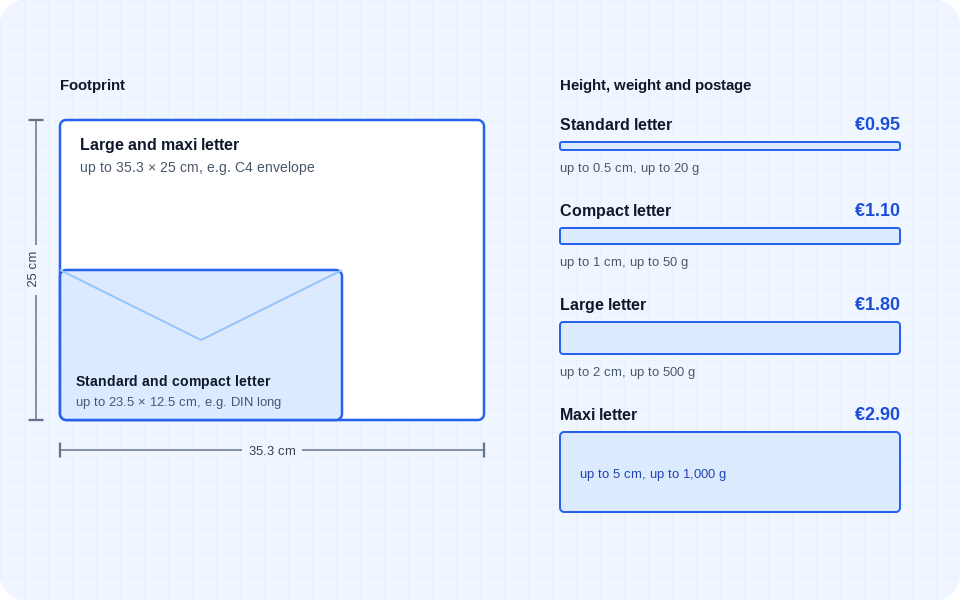
Letter postage 2026: prices, formats and sizes
In 2026 a standard letter and a postcard cost €0.95 with Deutsche Post, the compact letter €1.10, the large letter €1.80 and the maxi letter €2.90. Plus sizes, weight limits and surcharges for registered mail.
Read more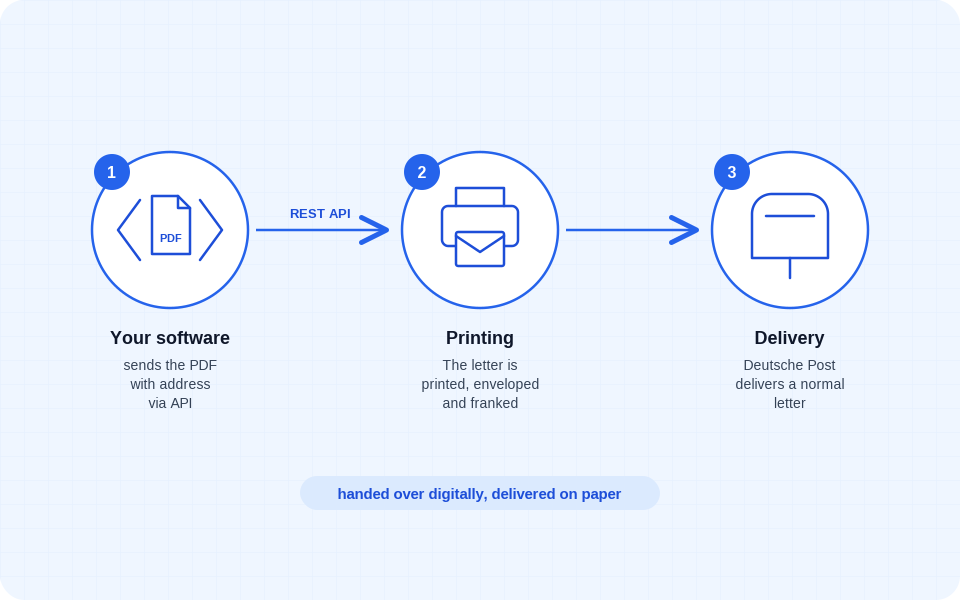
E-POST API and hybrid mail: sending letters via an interface
With the E-POSTBUSINESS API, software hands letters over digitally to Deutsche Post, which prints and delivers them. What the integration requires and when a provider with its own REST API gets you there faster.
Read more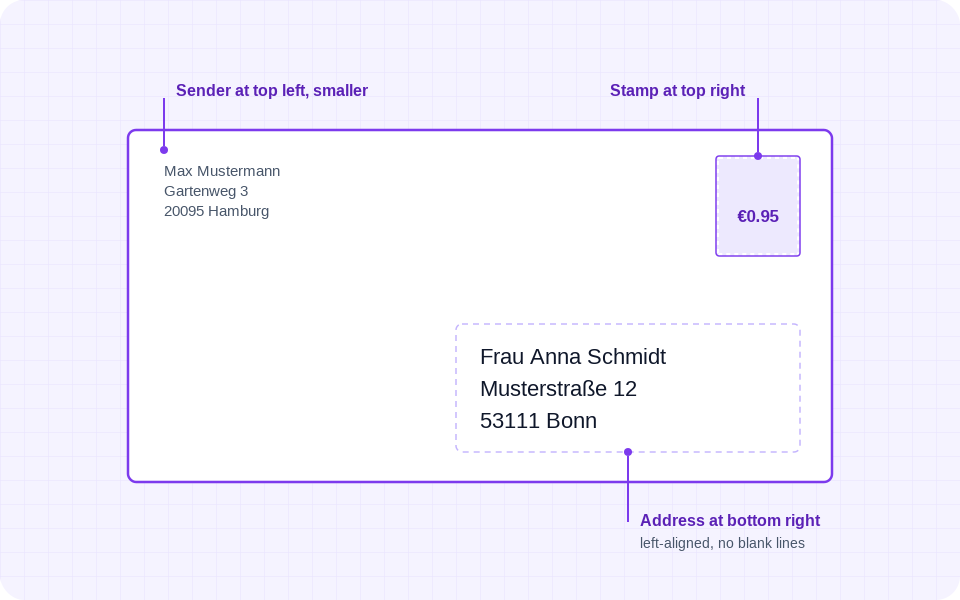
How to address an envelope: sender and recipient
The recipient goes on the front at the bottom right, the sender at the top left, the stamp at the top right. The address follows DIN 5008: name, street and house number, postcode and town, without blank lines.
Read more
Automate invoice sending
Sign up for free, create an API key and check your first invoices with a test key.